How to save and reuse discovery searches with saved filters in Leewou
Use saved filters in Leewou to reuse discovery searches, hide saved profiles, and keep repeat briefs clean across Instagram, TikTok, and YouTube.
If your team runs the same campaign shape every week, rebuilding the search from scratch is wasted time. Saved filters exist so your good logic survives past one session. The cleanup tools around them matter just as much, because a saved search is only useful if it stays clean when you reopen it.
Save the filter logic once it works
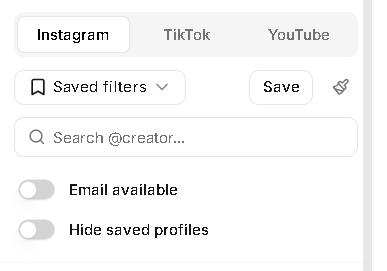
At the top of the Discover sidebar, the Saved filters menu sits next to the Save action and the Clear all button. As soon as the active filters are doing something worth repeating, save them. Good searches should become reusable assets, not something one person remembers in their head.
- Build the search until the first page looks like real candidates.
- Click Save.
- Give the filter a name the team will recognize later.
- Reload it from the Saved filters menu when the brief comes back.
This is better than keeping screenshots or handwritten notes about what you used last time. The filter lives where the work happens, and the team can come back to the exact same logic without reverse engineering it.
Update the current saved filter or branch it on purpose
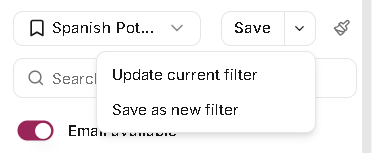
When a saved filter is loaded and you change the stack, Leewou treats that as a real decision. Save can update the current filter, or you can use Save as new filter to branch it. That matters when one good search turns into three market-specific versions over time.
- Update the current filter when the brief itself changed and the old version is no longer the standard.
- Save as new when you are testing a variation, like a new country, a new platform, or a stricter follower range.
- Do not overwrite working searches just because you are experimenting.
Pro tip: Name saved filters after the brief, market, and platform. US skincare creators - TikTok beats Summer test every time.
Remember that discovery state is platform-specific
Instagram, TikTok, and YouTube do not share one giant search state. Each platform remembers its own filters, sort order, page, and saved filter selection. That is helpful once you expect it, and confusing if you assume the tabs should mirror each other.
The upside is simple. You can keep one Instagram saved filter for brand partnerships, a different TikTok version for fast-moving UGC discovery, and a YouTube version for longer-form research without resetting the whole workspace.
Use Hide saved profiles and hidden profiles for different cleanup jobs
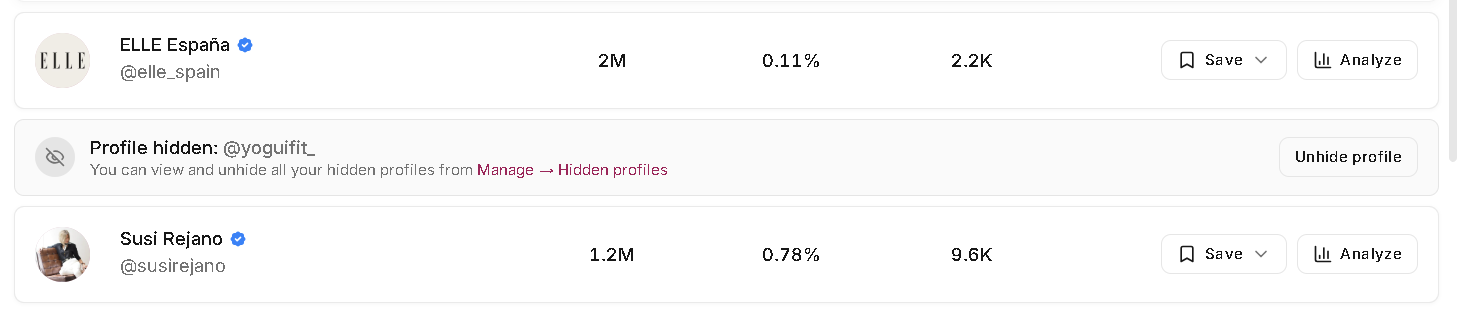
These two tools sound similar, but they do different things. Hide saved profiles is the top toggle for repeat searches. It removes profiles that are already saved to lists so you can focus on net-new names. Hidden profiles is the stronger action on an individual result row when you do not want that creator showing up in results.
- Use Hide saved profiles when the search logic is still good and you just want fresh candidates.
- Use Hide profile when a specific creator is a bad fit and you want them out of the way.
- Go to Manage > Hidden profiles when you need to review or unhide creators later.
Reset a bad search fast
Sometimes the search drifts. You add one extra filter, then three more, and now nothing makes sense. That is what Clear all is for. It is faster to reset than to babysit a broken search one field at a time.
If the result count is huge and the accessible limit warning appears, cleanup goes the other way. Do not clear everything. Remove the least important filter, tighten the one that reflects the brief, and save the better version once it stabilizes.
Reuse saved filters without making them stale
A saved search should be a starting point, not a relic. Reopen it, scan the first page, make the smallest change that reflects the current brief, and either update or branch it. That keeps your team's search logic current without turning the dropdown into a graveyard.
FAQ
Frequently asked questions about saved filters and cleanup
These are the questions that usually come up once a team starts repeating the same discovery work across markets, clients, or months.