Managing your subscription plan
How to upgrade, downgrade, switch billing intervals, and cancel your Leewou subscription - with accurate details on what changes immediately vs. at renewal.
Your subscription controls how many profiles you can analyze, how many searches you can run, and how many teammates can access the platform. You can change it at any time from the Plan & billing section - no support ticket required.
Where to find your plan settings
Go to Plan & billing in the left sidebar. The page has three tabs: Upgrade plan, Current plan, and Billing details. Only the account owner can see Upgrade plan and Billing details. Team members on your workspace can only view the Current plan tab.
If you don't see the Upgrade plan tab, you're logged in as a team member rather than the account owner. Reach out to your workspace owner to request a plan change.
Leewou plans at a glance
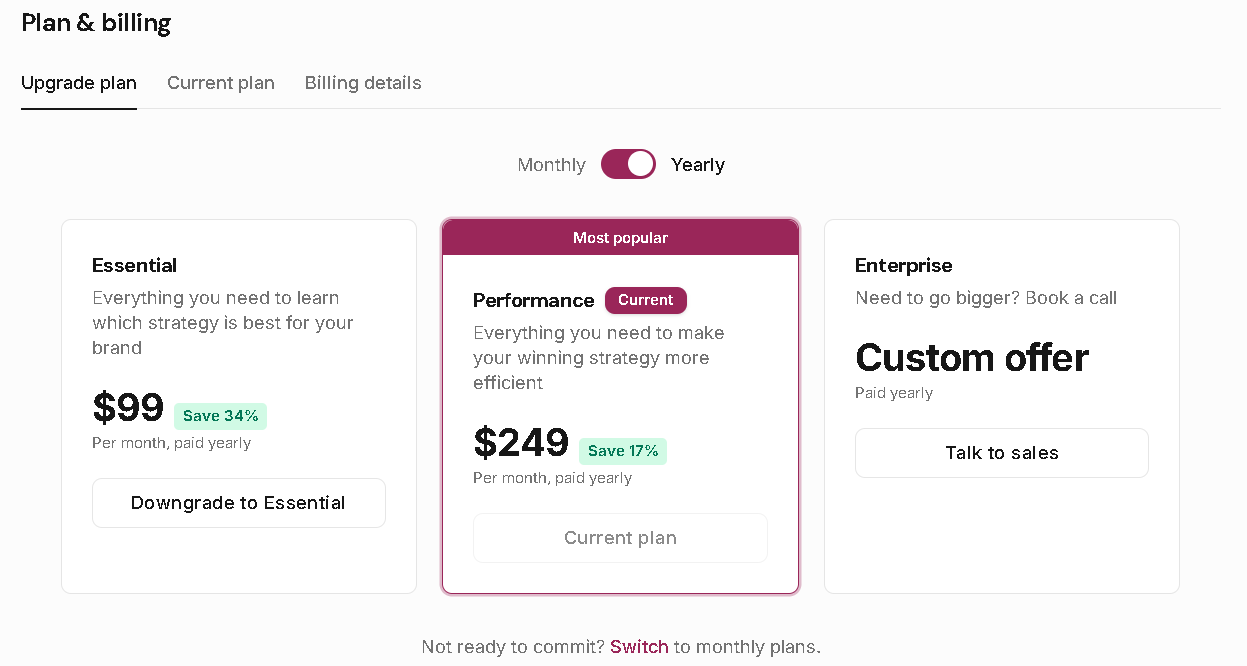
There are three paid tiers. Every plan includes unlimited searches, so the main difference is how many profiles you can fully analyze each month and how many team seats you get.
- Essentials - 300 profile analyses/month, 2 team seats. $149/month or $99/month on yearly billing.
- Performance - 800 profile analyses/month, 5 team seats. $299/month or $249/month on yearly billing.
- Enterprise - 5,000+ profile analyses/month, up to 25 team seats. Starting at $6,999/year. Contact sales.
The trial gives you 20 analysis credits and 40 search credits to explore the platform before committing to a plan.
Pro tip: Yearly billing saves around 33% on Essentials and 17% on Performance. You can switch between monthly and yearly at any time - it takes effect at the start of your next billing period.
How to upgrade your plan
Upgrades take effect immediately. You'll get access to the higher credit limits and team seats right away, and Paddle (our payment processor) will charge the prorated difference for the remainder of your current billing period.
- Go to Plan & billing → Upgrade plan.
- Toggle the billing interval if you want to switch between monthly and yearly.
- Click Upgrade to [plan name] on the plan card you want.
- Review the confirmation dialog - it shows what you're moving from, what you're moving to, and what you'll be charged.
- Confirm. Your new credits and seats are available immediately.
How to downgrade your plan
Downgrades are scheduled rather than immediate. When you request a downgrade, your current plan stays active until the end of the billing period - you keep all existing access and credits. On renewal, the new plan takes over.
- Go to Plan & billing → Upgrade plan.
- Click Downgrade to [plan name] on the plan card you want.
- Review and confirm. You'll see a banner on both the Upgrade plan and Current plan tabs showing when the downgrade is scheduled.
If your team has more members than the lower plan allows, you'll need to remove members before the downgrade takes effect. Essentials supports 2 seats; Performance supports 5.
Changed your mind? You can cancel the scheduled downgrade at any time before the renewal date by clicking Cancel Scheduled Change on the banner. Your plan stays exactly as it is.
Switching between monthly and yearly billing
You can switch your billing interval without changing your plan tier. The process works the same way - the change is scheduled for your next renewal date rather than applying mid-cycle. Toggle the billing interval on the Upgrade plan tab to see the price difference before you commit.
How to cancel your subscription
Cancellations are handled through the Paddle Customer Portal. When you cancel, you keep full access to your current plan until the end of the billing period. Nothing gets deleted - your lists, notes, and data stay intact.
- Go to Plan & billing → Current plan.
- Scroll to the bottom and click Cancel Plan.
- You'll be redirected to the Paddle Customer Portal to complete the cancellation.
- Once confirmed, your plan shows a cancellation date and an access-until date.
After cancellation, your workspace stays accessible until the end of the paid period. Resubscribing is available from the Current plan tab at any time.

FAQ