How to read audience demographics and profile analytics in Leewou
Read audience demographics and profile analytics in Leewou so you can judge fit, risk, and reach before outreach.
Profile Analytics is where Leewou stops being a search tool and starts being a decision tool. In Discovery, the creator panel can pair Relationship on the left with Profile Analytics on the right, which gives you audience data, content patterns, growth history, and contact context without bouncing between views. The trick is knowing what to read first so you do not turn every profile into a ten-minute detour.
Open Profile Analytics when the row already looks close
The Analyze button makes the most sense after a creator survives the first pass in Discover. If the follower size, engagement rate, average engagement, and surface fit already look promising, open the sidebar. If the row looks wrong, fix the search instead of hoping the deeper data will rescue it.
Pro tip: Use Profile Analytics to confirm a fit or explain a risk. Do not use it as a substitute for clear search logic.
Start at the top and answer the obvious questions first
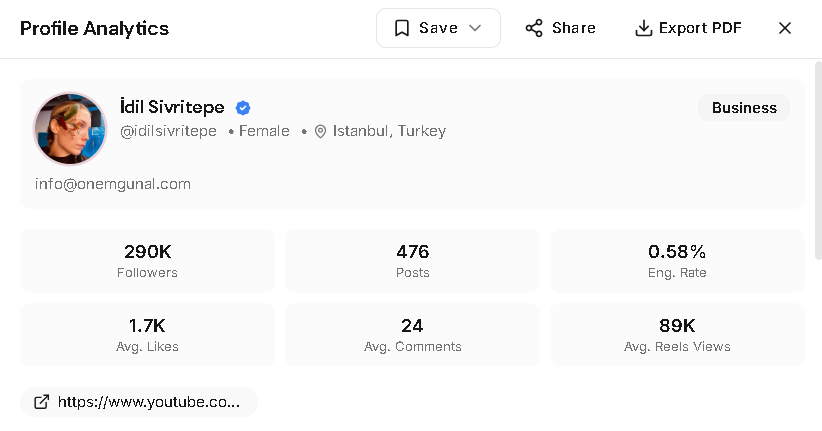
The header and quick stats do a lot of work fast. You get the creator name, platform handle, account type or platform label, gender and location when available, a short intro, and the quick stat cards below. That gives you the size and shape of the profile before you dig into the audience tabs.
- Followers or Subscribers tells you the scale.
- Posts or Videos tells you whether the account is active enough to judge.
- Eng. Rate, Avg. Likes, Avg. Comments, and view metrics tell you how the audience responds.
- Public contact chips can surface phone numbers and website-style links near the top of the panel.
- Email is a separate action in the Relationship panel, where Unlock Email is handled on its own instead of appearing as a top chip.
- Save to list, Share, and Export PDF let you move the profile into team review without losing context.
This part should answer three questions quickly: who is this creator, what level are they operating at, and does this profile deserve a closer audience review.
Use audience demographics to test buyer fit
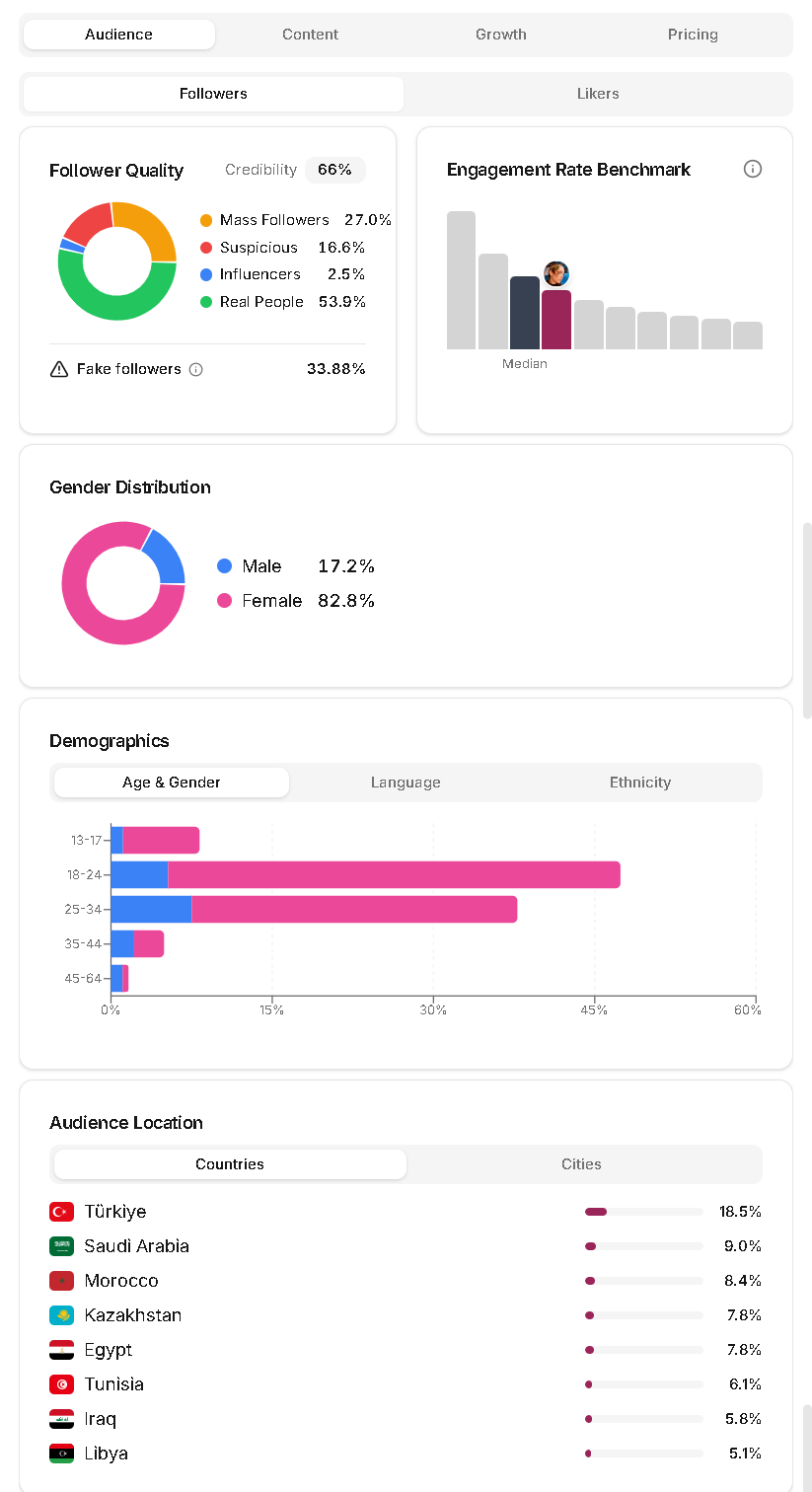
The Audience tab is the real center of gravity. Depending on the profile, you may see Followers or Subscribers, Likers, and Commenters as separate views. That matters because the people who follow a creator are not always the same people who actively like or comment on the content.
- Follower quality and gender charts help you spot basic audience shape fast.
- Demographics breaks out Age & Gender, Language, and Ethnicity when the data is available.
- Location shows Countries and Cities so you can tell whether the audience is in-market.
- Audience Interests and Brand Affinity help you judge category overlap.
- Significant Followers, Significant Likers, or Significant Commenters show the concentration of notable or high-signal users.
- Follower Reachability shows how crowded the audience's feeds are, which is useful when organic reach matters.
No single chart closes the case. A creator can have the right age split but the wrong countries. They can have strong scale but weak likers. Good review comes from reading the audience layers together, not chasing one perfect stat.
Use content and growth to explain the numbers
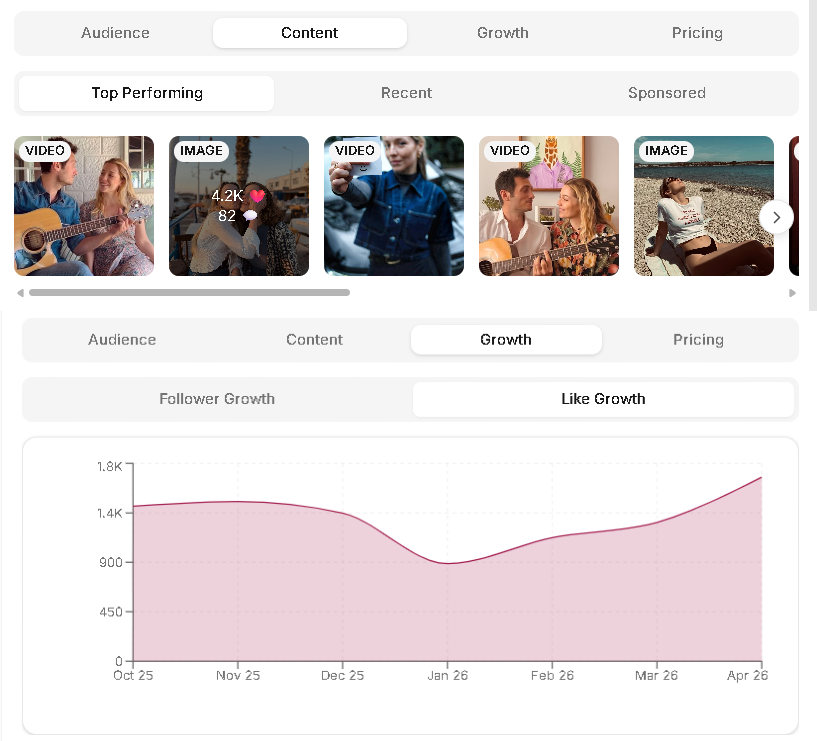
The Content tab helps you understand what is driving performance. Depending on the profile, you can compare Top Performing, Recent, and Sponsored content, then scan hashtags, mentions, and TikTok relevant tags if they exist. This is where you check whether the good numbers come from repeatable category fit or one lucky spike.
The Growth tab answers a different question. Is the account stable, climbing, flattening, or riding one sharp jump? Instagram usually shows follower and like growth. TikTok can add average views and total likes. YouTube can show subscriber growth, total views, and like growth. Use these charts to judge momentum, not to hunt for a perfectly smooth line.
Use Pricing, Share, and Export when the profile needs a decision
Some profiles surface a Pricing tab. When it appears, treat it as an estimate, not a signed quote. Estimated Pricing shows likely price ranges by post type, and Price Factors explain which signals pushed the estimate up or down.
If the profile deserves discussion, do not keep the insight trapped in your own tab. Share creates a link. Export PDF gives you a cleaner artifact for internal review. Both are useful when the team needs to decide without reopening the search together.
Know what the empty and loading states are telling you
Not every profile will have full audience demographics on day one. If Leewou says the profile is being analyzed for the first time or is currently updating, the UI tells you to check back in around 20 minutes. If the profile is too new, too small, or recently private, the sidebar can show that no audience data is available yet.
That is not a manual fix on your side. The right move is to keep the search moving, save the profile if it is still interesting, and come back when more data exists.
FAQ
Frequently asked questions about Profile Analytics
These are the questions that usually come up once teams stop asking where the data is and start asking how to use it well.